WABA Upgradation
The docs cover several scenarios to upgrade the WABA.
At all times, keep the official api documentation open, before hitting any crucial(post/put) API. Make sure, there are no changes in the API structure in postman and in the docs.
Vanilla Scenario
Before starting the process please perform a health check to get the current status of WABA. i.e you should know how many coreapps, master is connected or disconnected, Also check on server to verify the status of docker containers are running. When restoring a multiconnect setup, you need to perform the restore on top of the same type of setup you are restoring from. For example, if you backed up a setup with two shards running, you must have two shards running for the restore.
Inital Steps
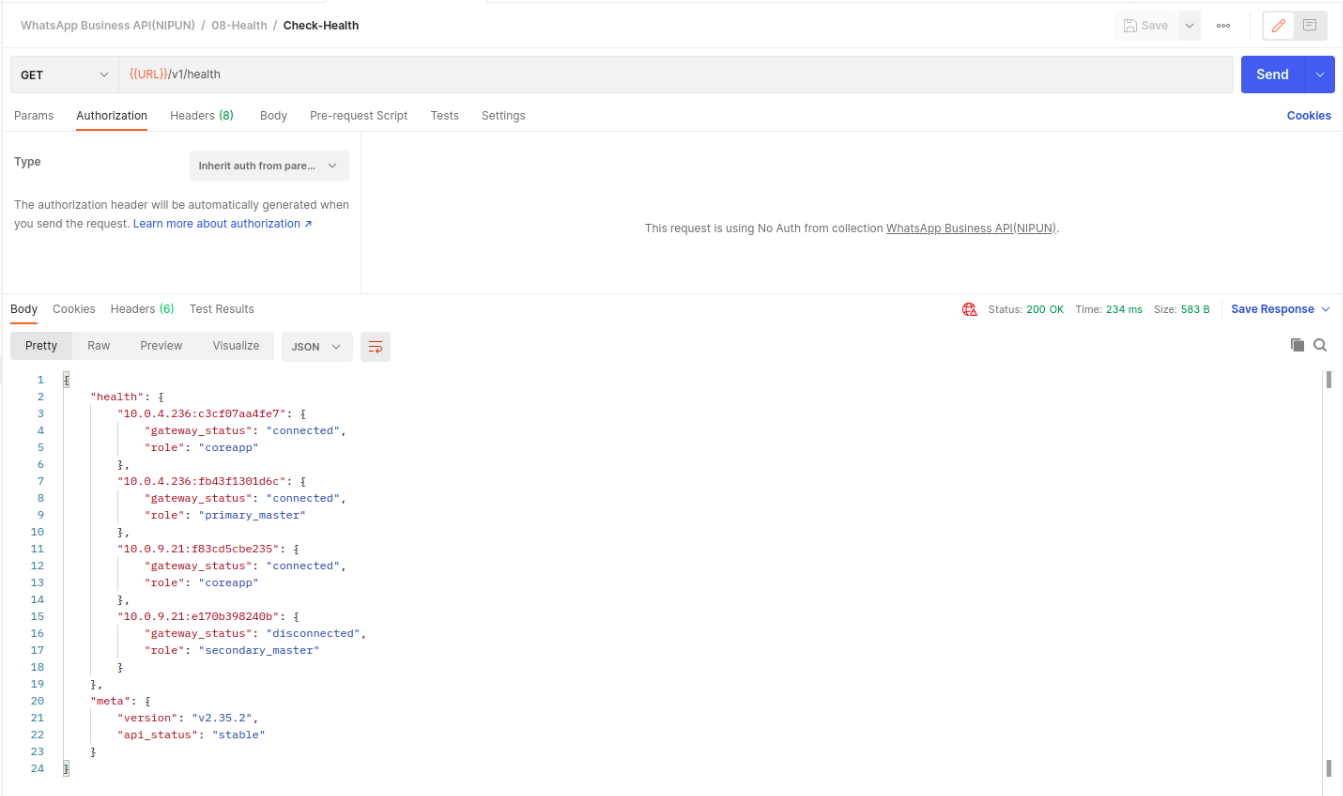
- Perform a health check on the WhatsApp Business API client using an health API /v1/health to check the status.Kindly refer below SS:
- SSH into WABA server
- sudo docker ps
Check how many wacore,waweb,master,db containers are there
Take backup of existing all necessary information including app settings and registration.
- To back up, use the /v1/settings/backup endpoint with the password field.
- NOTE:
You must use the admin account to access the backup and restore settings. - Ref
Also get all settings and shards infomation using get settings API
/v1/settings/applicationand get shards API/v1/account/shardsand save both API output in your local.SSH into the WABA servers
- sudo su
- Update the API version in file /etc/environment on server with new version.
- cd /var/whatsAppClient/biz/
- Run commands in format as below to perform any action for containers:
General format of the command:
WA_API_VERSION=APIversion EXTERNAL_HOSTNAME=ServerIP docker-compose -f ./prod-multiconnect-compose.yml ps
Check Status of Existing containers:
Currnet WA API Version: 2.41.2- WA_API_VERSION=2.41.2 EXTERNAL_HOSTNAME=ServerIP docker-compose -f ./prod-multiconnect-compose.yml ps
To upgrade the all containers with new API version.
- Note:
Kindly Update below WA API version to New API version and Server IP acc to servers. - WA_API_VERSION=2.41.2 EXTERNAL_HOSTNAME=ServerIP docker-compose -f ./prod-multiconnect-compose.yml up -d waweb
- WA_API_VERSION=2.41.2 EXTERNAL_HOSTNAME=ServerIP docker-compose -f ./prod-multiconnect-compose.yml up -d wacore
- WA_API_VERSION=2.41.2 EXTERNAL_HOSTNAME=ServerIP docker-compose -f ./prod-multiconnect-compose.yml up -d master
- Note:
Verify the containers are running:
- WA_API_VERSION=2.41.2 EXTERNAL_HOSTNAME=ServerIP docker-compose -f ./prod-multiconnect-compose.yml ps
Perform a health check on the whatsApp business API client using an health API /v1/health to check the status.
- Coreapps and one of the master should be connected in response.
Now check the whatsapp fucntionality.
- To drop a msg using whatapp no. and wait for reply.
- If reply don't come as expected then check waweb logs.
- If reply comes quickly with expected response i.e all functionalities are good as expected and you are good to go.
Now Update the cron on WABA servers:
- To check the existing cron
sudo crontab -l- You will see crons same as below and replace the container ids old to new.
0 0 * * * docker exec 274ef693e3e4 /opt/whatsapp/bin/cleanup.sh > /dev/null 2>&1
- To check the existing cron
Update old container ids with the new containers ids in crontab.
- To check the docker container ids
sudo docker ps - To update the cron on server
sudo crontab -e
- To check the docker container ids
Check docker images and delete the old images
- only 2 api version images should be there i.e last and latest version
- Delete older than last 2 versions.
- To check docker images
sudo docker images - To delete the docker images
sudo docker rmi image_id
Fallback Scenario (Backup/Restore)
The purpose of the backup/restore here copy of data that can be recovered in the event of above scenario failure.
You already have backup of the data which you have taken in above scenario.
Now to be safe, you need to take backup of mysql data folder on server.
To backup the mysql data folder follow the steps:
- SSH into the WABA DB server.
- sudo su
- cd /var/whatsAppClient/biz/
This dir contains all config files for the setup and all commands to start/stop or any activity you perform on the containers run only in this directory - ls -al (you will see mysylData folder)
- cp -aR mysylData mysylData-Backup
Stop and delete all existing containers if you are restore on the same server.
- Run below commands to stop and delete all containers.
- WA_API_VERSION=2.41.2 EXTERNAL_HOSTNAME=ServerIP docker-compose -f ./prod-multiconnect-compose.yml down -v
Create a new Setup with same structure on the server.
- Run below commands to start the new containers.
- Note:
Kindly Update below WA API version to your API version and Server IP acc to servers. - WA_API_VERSION=2.41.2 EXTERNAL_HOSTNAME=ServerIP docker-compose -f ./prod-multiconnect-compose.yml up -d db
- WA_API_VERSION=2.41.2 EXTERNAL_HOSTNAME=ServerIP docker-compose -f ./prod-multiconnect-compose.yml up -d waweb
- WA_API_VERSION=2.41.2 EXTERNAL_HOSTNAME=ServerIP docker-compose -f ./prod-multiconnect-compose.yml up -d wacore
- WA_API_VERSION=2.41.2 EXTERNAL_HOSTNAME=ServerIP docker-compose -f ./prod-multiconnect-compose.yml up -d master
Verify all containers are running:
- WA_API_VERSION=2.41.2 EXTERNAL_HOSTNAME=ServerIP docker-compose -f ./prod-multiconnect-compose.yml ps
Perform first login with login admin API:
- Ref
- copy env from existing envs and env should look like same as below SS:
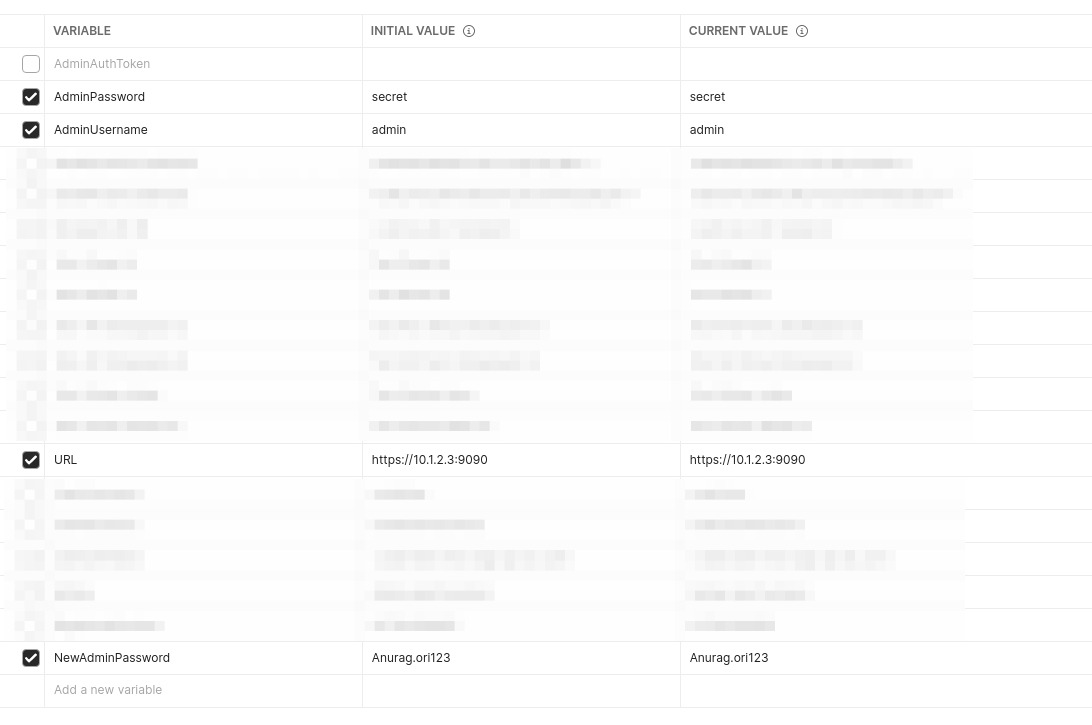
- Update env with server IP or domain to your ip and NewAdminPassword to newpassword what you choose.
- Update admin API with few changes same as below SS:
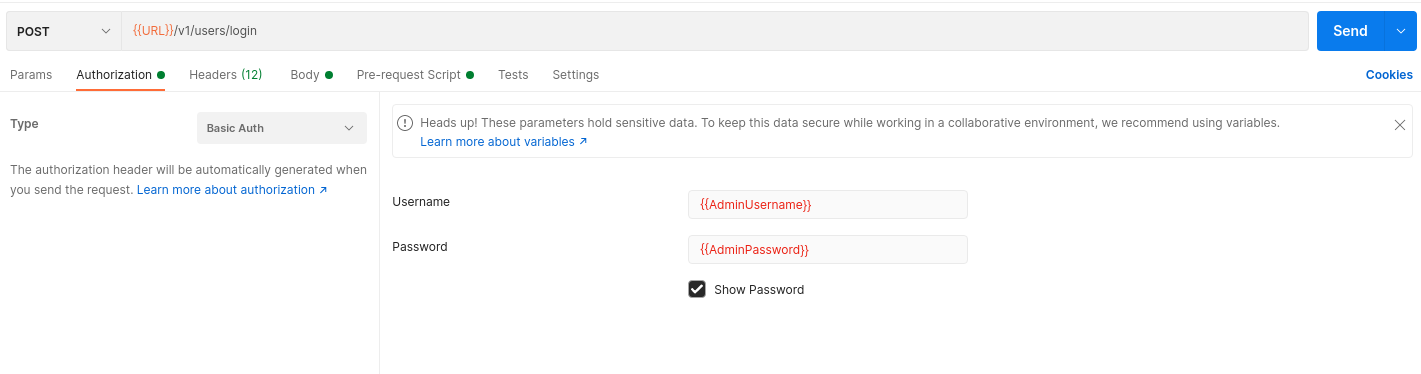
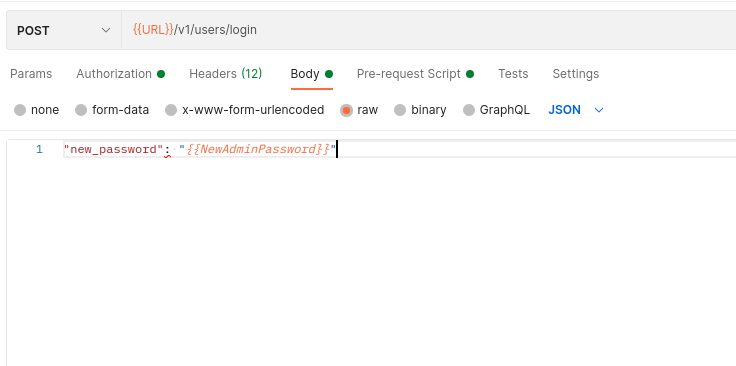
- Then send the request & get your authentication token in response.
- For other API's you must use the authentication token that is returned after a successful login.
- Update this token in your env in AdminAuthToken and change admin pass with newpassword what you choosed in NewAdminPassword var in env.
- Untick admin creds and newpassword vars and tick only URL with your server IP and AdminAuthToken with your updated token then save the env.
- Perform health check to get the status of WABA.
- After that delete your env and update auth token in original env.
- Now you are able to perform other activitivities with token.
Create a new code user using the API /v1/users. This is the user used in the .env, check the respective brands .env file for the userName and userPassword. By default, these are the details which we use
- userUsername : codeUser
- userPassword : codeUserPassword.123
- Ref
Perform Restore
- To restore settings, use the /v1/settings/restore endpoint with the password and data fields.
- The password you used in the /v1/settings/backup API call to encrypt the backup data.
- The data that was returned by the /v1/settings/backup API call.
Again verify the containers are running:
- WA_API_VERSION=2.41.2 EXTERNAL_HOSTNAME=ServerIP docker-compose -f ./prod-multiconnect-compose.yml ps
Then Perform heath check to get the status using an health API /v1/health.
Fallback with re-registration
In case Backup/Restore doesn't work properly so you need to do re-regitration of an account. For this, Follow fallback steps except Restore.
Note:
Don't need to perform Restore in this Case.Re-registraion Process
- Ref
- To re-register, you must have Phone Number,OTP and the certificate associated with that phone number.
- You will get certificate using Facebook Business Manager Console or you can contact to backend team member who is workig on that project.
- You will get OTP for registraiton from the brand and phone no. from your Devops Lead.
- In our case sanath will have access to the console, but you can contace to Devops lead for all informations.
- After getting all information, first hit the request code api using given details such as phone no. and certificate. it will send a OTP to given phone no.
- Then get the OTP from the brand and proceed with registeration of account using API /v1/account.
- After successfully registration, perform the health check once and check one of the coreapp should be in connected state.
- Then update the settings using API /v1/settings/application.
- After setting updation, set the shards using API /v1/account/shards.
- Note:
Before updating the settings and shards please take ref from the backup what you had taken in starting. it should be same as before - Now again perform the health check and check the status that all are connected as expected.
- If all are good then connect to the mongodb of that brand and go to the whatsAppTokens collection & update the value of expireAfter with any date before that day.
- After that ssh into every app/webApp server of that brand and restart ocs or you can redeploy ocs from jenkins as well.
- Now check the whatsapp fucntionality, drop 2-3 messages using whatapp no. and wait for response.
- If reply comes quickly with expected response i.e all functionalities are good as expected and you are good to go.
- Then Inform the project team for proper testing.