Buttons and Variables
Initializing buttons and variables
Explanation
Buttons and variables can be defined through dashboard as well as custom buttons and custom variables through custom_message_doc
Note - All the buttons, variables and messages are stored in DB.
Buttons are the integral part of a message, they are used for option selection or as a suggestion for the user.
Variables can be used to carry bot messages, functionality and for workflow movement. Variables used for workflow movement should be defined or created through Dashboard under Bot builder-> Bot Params.
Variables assigned to a message can also be created through custom_mesage_doc.
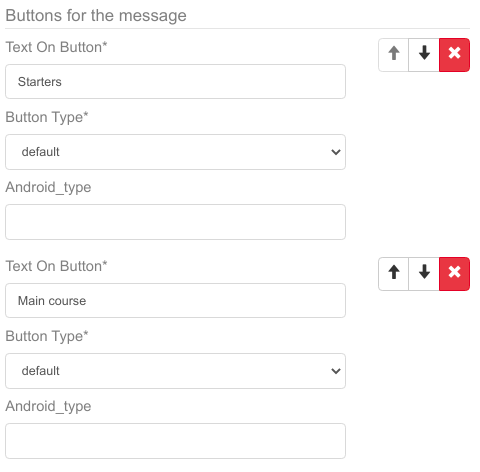
Buttons defined through dashboard under Bot Builder->Bot Messages
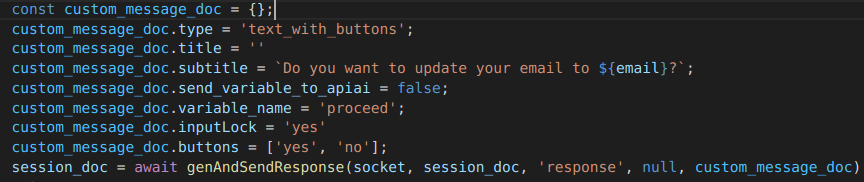
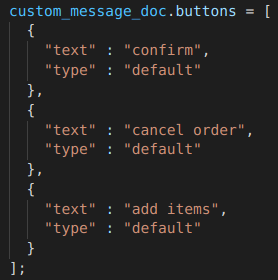
Custom buttons defined through custom_message_doc
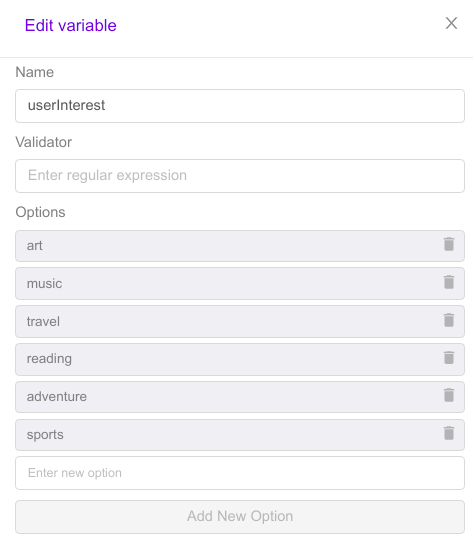
Variables defined through dashboard in Bot Builder->Bot Params
Variables defined through custom_message_doc

All Variables Must Be Defined In DB Before Use Except relayData variables of custom message
Take User Input In Variable
Explanation
If you define a message with the attached variable , and when bot prints that message and in response whatever the user reply that will store that value to that variable , then you can validate and use it for processing and functioning.
Take User Input Through Buttons
Explanation
When a user taps on a button of the message, it assigns the text on the button to the variable assigned to that specific message. This variable is then stored into our DB with the assigned value.
Note that - A variable assigned to a button can hold a string.
Update Variable Value In DB
Explanation
For the proper functioning and workflow bot have to save variable data in Db.
This is the function which can stores value in DB update_entities_in_db_without_check
And below is the sample code to update value of input_variable in DB
    session_doc = await update_entities_in_db_without_check(session_doc, {
        input_variable : value
    });
Fetch Value Of Variable From DB
Explanation
To get the value from the session_doc , you can check in its context variables and fetch the value from there.
Like this-
const input_variable = (session_doc.context_variables.input_variable)?session_doc.context_variables.input_variable:null;