sunset
danger
- DON'T PERFORM THIS ACTIONS UNLESS IT IS MANDATORY
- Get the strong confirmation from the
DevOps Lead
- This doc explains about the sunset operation.
- Sunset of a server is to
plan to intentionally remove or discontinue it. - There are two types of sunset.
Hard sunset: In this we take complete backup of all data and terminate all the resources. This is more cost effective than soft sunset but takes longer and more efforts to restore.Soft sunset: In this we just stop the instances instead of deleting/terminating them. We do delete any resources that have a fixed monthly charge..(like load balancers) and are easy to spin up again. This allows very fast and hassle-free/restoration, in case the setup needs to be made live again.
Hard Sunset
- Cost Incurred: In this we incur charge only for the data backed up to S3. Below is the monthly cost for a typical brand(varies with the amount of data being backed up)
- single_stack (dev): ~$0.5/Month
- multi_stack (prod): ~$1-2/Month
- Use Case: When a setup needs to paused/turned off for an unknown duration of time. Typically for more than a month.
- A setup was requested, but there's delay from client side.
- Termination of client contract.
- End of a POC.
- etc.
- Restoration timelines: Typically, add a day to the below mentioned timelines as these timelines does not include the tasks the team might have a planned.
- single_stack (dev): ~1-2 days
- multi_stack (prod): ~2-3 days
Soft Sunset
- Cost Incurred: In this we incur charge only for the EBS volumes of the servers. Below is the monthly cost for a typical brand.
- single_stack (dev): ~$3/Month
- multi_stack (prod): ~$6-9/Month
- Use Case: When a setup needs to paused/turned off for know duration of time in the range of up to ~2-3 weeks.
- A setup was requested, but there's delay from client side.
- A client contract ended, but the data might be required for report generation or similar activity.
- etc.
- Restoration timelines: Typically, add a day to the below mentioned timelines as these timelines does not include the tasks the team might have a planned.
- single_stack (dev): ~1-2 days
- multi_stack (prod): ~2-3 days
single_stack
common_steps
These are the common steps need to perform for both
softandhardsunset.single stack contains the
FullstackanddevAIservers.The sunset process for single_stack refers to the
- Login to the
Fullstackserver of respective brand.- Take the backup of the existing data from the mongodB container
- create a directory
db-backupon home directory. - Copy the content of the database into the newly created folder for backup
db-backup. - Now, copy the content of the
db-backupfolder to thes3://ori-db-backup/brand_name/Backup/database/Development/oriserveDemoDB/(change the brand_name as per the requirement.)
- Login to the
You can use the below script for taking the backup of the database and copy to the S3 bucket.
#!/bin/bash
echo "Please enter DB service type : "
read -rp "Default[docker] : " dbServiceType
[[ -z ${dbServiceType}  ]] && dbServiceType="docker"
echo "Please enter DB name : "
read -rp "Default[oriserveDemoDB] : " DBName
[[ -z ${DBName}  ]] && DBName="oriserveDemoDB"
echo "Please enter DB user : "
read -rp "Default[dbOwner] : " DBuser
[[ -z ${DBuser} ]] && DBuser="dbOwner"
echo "Please enter DB user's password : "
read -rp "Default[oriSaaSdemo1092] : " DBuserpass
[[ -z ${DBuserpass} ]] && DBuserpass="oriSaaSdemo1092"
echo "Please enter S3BucketName to upload backed up DB : "
read -rp "Default[ori-db-backup] : " S3BucketName
[[ -z ${S3BucketName} ]] && S3BucketName="ori-db-backup"
echo "Please enter ProjectName : "
read -rp "Exits on empty string : " ProjectName
[[ -z ${ProjectName} ]] && echo "ProjectName is required. Exiting.." && exit 1
echo "Please enter Environment : "
read -rp  "Default[Development] : " Environment
[[ -z ${Environment} ]] && Environment="Development"
#echo "${Development} ${DBName} ${DBuser} ${DBuserpass} ${S3BucketName} "
############ BackupDB ############################################
sudo mkdir -p /backupDB
cd /backupDB
if [[ ${dbServiceType} = 'docker' ]]; then
   ############### DOCKER ###################
   #mongodump -d ${DBName} -h 127.0.0.1:27017 -u ${DBuser} -p ${DBuserpass} --authenticationDatabase ${DBName} --gzip -o ./
   docker exec mongoDB mongodump -d ${DBName} -h 127.0.0.1:27017 -u ${DBuser} -p ${DBuserpass} --authenticationDatabase ${DBName} --gzip -o ./
   [ "$?" -eq 0 ] && sudo docker cp mongoDB:/${DBName} /backupDB/${DBName}  || exit 1
   [ "$?" -eq 0 ] && (docker exec mongoDB [ -d "/${DBName}"  ]  && (echo "dump dir exists in container" && exit 0) || (echo "dump dir doesn't exist" && exit 1)) || exit 1
   [ "$?" -eq 0 ] && (docker exec mongoDB rm -rf /${DBName} && echo "dump dir removed from container" || echo "unable to remove dump dir from container")
   ############### DOCKER ###################
else
   ############### SERVICE ###################
   mongodump -d ${DBName} -h 127.0.0.1:27017 -u ${DBuser} -p ${DBuserpass} --authenticationDatabase ${DBName} --gzip -o ./
   ############### SERVICE ###################
fi
#################### UploadtoS3 #####################################
[ "$?" -eq 0 ] && echo uploading to s3
aws s3 cp /backupDB/${DBName} s3://${S3BucketName}/${ProjectName}/Backup/database/${Environment}/${DBName}/ --recursive
#aws s3 cp /backupDB/${DBName} s3://${S3BucketName}/${ProjectName}/Backup/database/${Environment}/${DBName}/ --recursive --storage-class GLACIER
echo removing local backup directory
sudo rm -rf /backupDBRun the script with
sudoprivilages.While running the script you need to provide some details like
DBname,DB user,DB user's password,s3bucketName,projectname/brandName,Environment.
JENKINS_JOBS_BACKUP
- Now, we need to take the backup of the respective brand jobs.
- Login to the
jenkinsserver.- Go to the location
/var/lib/jenkins/. - check for the backup folder. If it is not there create a directory
jobBackup. - Create a new folder for the brand_backup
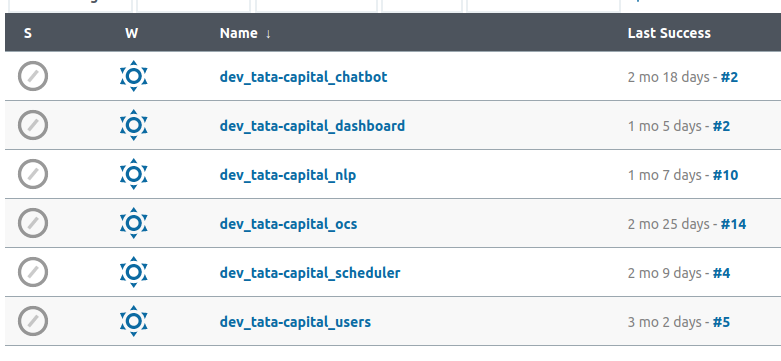
env_brandName_jobsinside thejobBackup - Switch to jenkins user
sudo su jenkins - Let's say brandName is
tata_capitalcreate a directory nameddev_tata_capital_jobs - Copy the all jobs of
tata_capitalto thetata_capital_jobsdirectory.- command :
cp -a /var/lib/jenkins/jobs/dev_tata-capital_* /var/lib/jenkins/jobBackup/dev_tata_capital_jobs/
- command :
- Go to the location
- Now, you have taken backup of all jobs of required brand.
- Zip the folder
tata_capital_jobs- command :
zip -r tata_capital_dev_jobs.zip dev_tata_capital_jobs
- command :
- You will find a folder in s3 under the respective brand
backup - Upload this zip folder to the location
s3://oriserve-demos/tata-capital/Backup/Environment/Development/Jenkins/ - Replace the Environment according to the requirement.
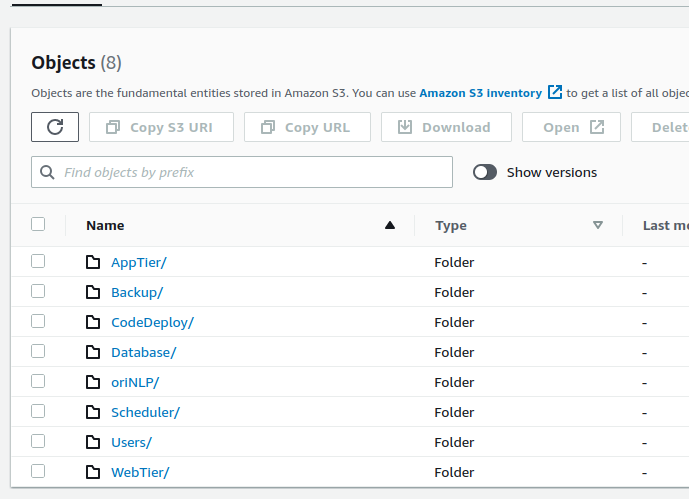
- Disable the respective jenkins jobs.
PNG_DASHBOARD
- After deleting all the resources,
- Login to the grafana
- Whenever you opened the Grafana, click on the
General, top left. - Search the brand you want to delete.
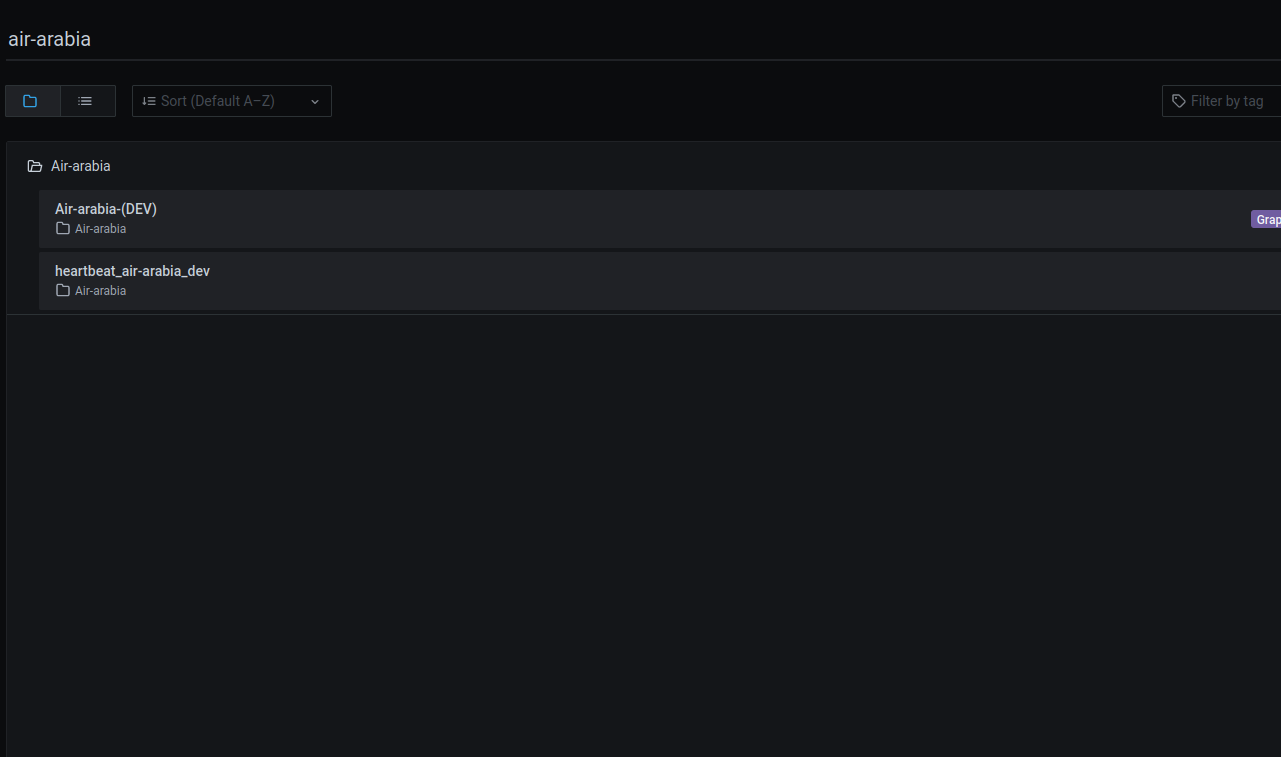
- Search for the respective dashboard, here incase
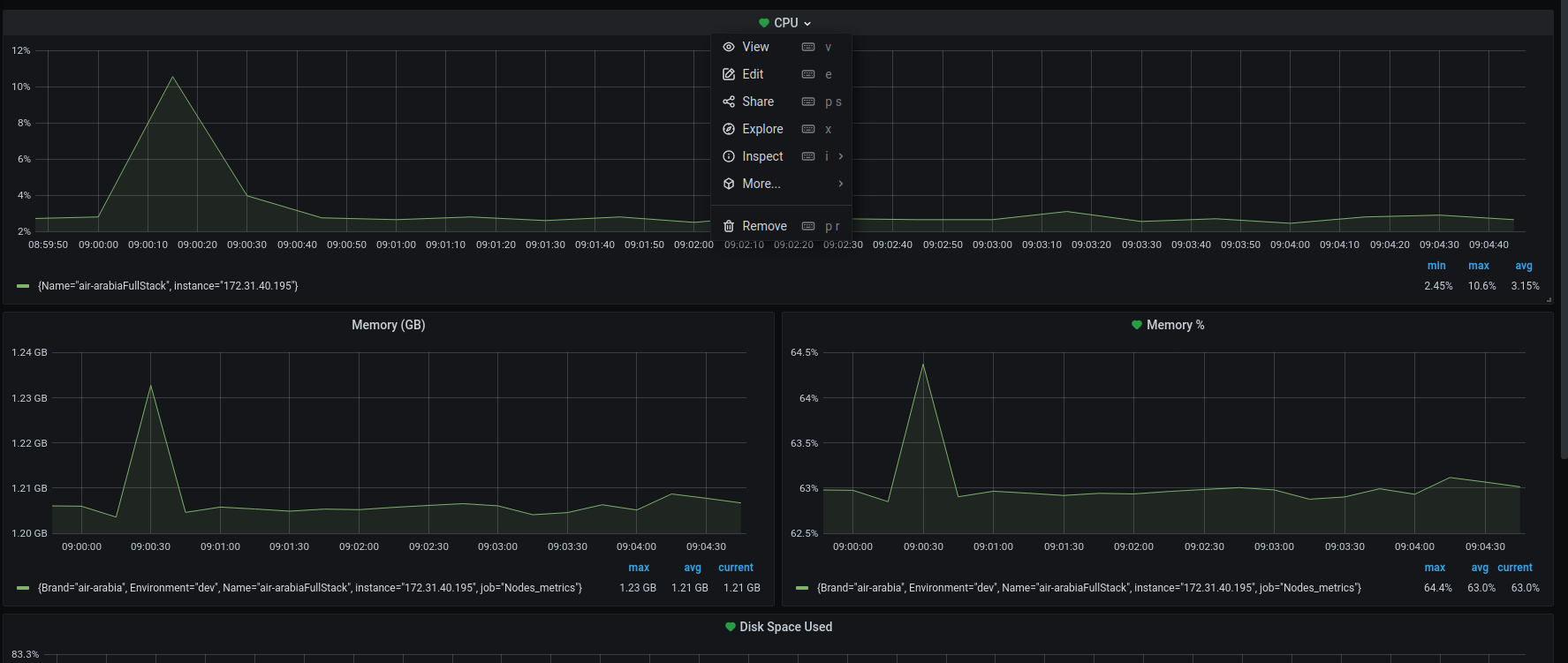
air-arabiadashboard. You can see in below image reference. - Delete all the monitoring dahsboards. Below image is for only ref.
- Click on the specification you want to delete, click on the
Removeand confirm the removal. - Delete all the dashboards under repective brand.
soft
- After successfully taking the backup,
- Enable the
TerminationProtection.- Go to
Actions-->Instance settings-->Change instance termination protectionand selectenable.
- Go to
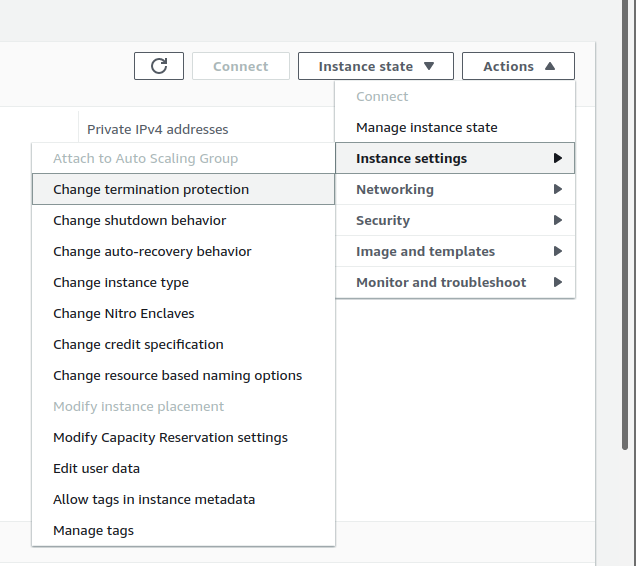
Stop the
Fullstack,AIinstances as below.Go to
Instance state-->Stop Instance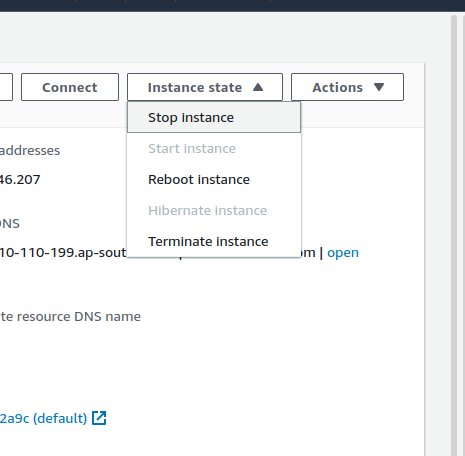
bot_heart_beat
- For
bot_heart_beatprocess of soft sunset. Refer to the, bot_heart_beat
hard
- If the stack is created through
cloudformation, delete the stack through cloudformation only.Below image is for reference. - Go to the AWS console and search for the
cloudformationservice. - Search for the required brand. Let's say
Baja-thai
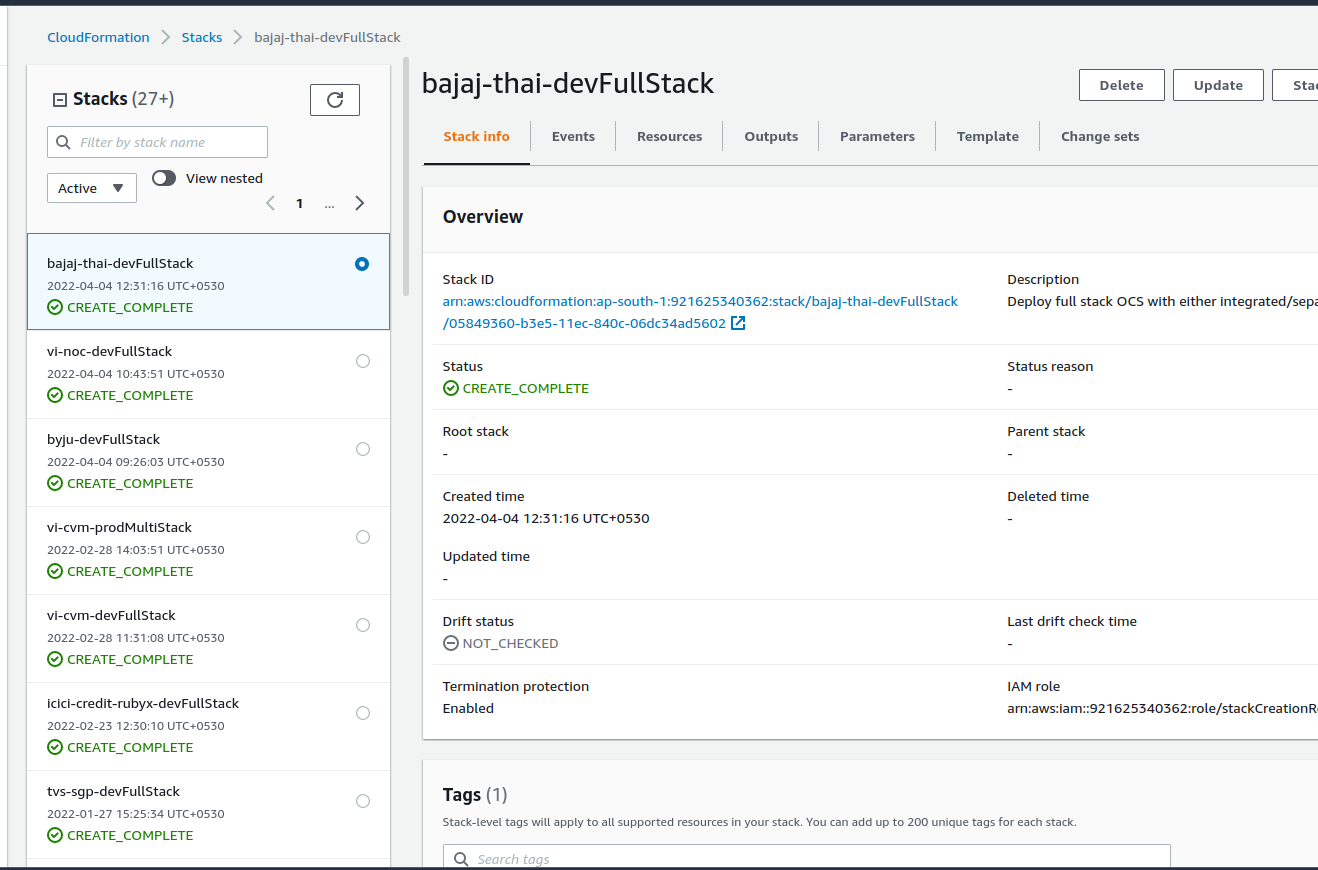
- If the stack is created manually, delete the instances manually.
S3 archival
- Archive (move) the deleted brands to the
Archieved/folder in theoriserve-demosbucket.
bot_heart_beat
- For
bot_heart_beatprocess of soft sunset. Refer to the, bot_heart_beat
Access_management_changes
danger
- Before performing this action, Make sure all the environmets has been deleted/stopped.
- If you are not sure, get the confirmation from
DevOpsLead
- After performing the necessary hard sunset operation, we need to update the brand details to sunset folder,which indicates that particatular brand has deleted.
- In your local, clone the access_management repo.
- In the repo, we will find the
projectsfolder where all our projects access details will present. Let's say our brand isbaja-thai- Location to our brand
bajaj-thaiwill beprojects/bajaj-thai
- Location to our brand
- We will find the
sunsetfolder along with theprojectsinside theaccess_managementrepo. - If we need to sunset the
bajaj-thaibrand . Move theBajaj-thaibrand fromprojectsfolder tosunsetfolder.- Command :
mv projects/bajaj-thai sunset/
- Command :
- After updating, commit the changes and raise a PR.
- commands :
git add . git commit -m "your message"git push -u origin <your branch>
- commands :
- After pushing the changes, raise a PR.
DevOps Leadwill review the changes and will merge.
multi_stack
common
- These are common steps need to perform for both
softandhardsunset. - Multistack contains the
Utility,NLP,Webapp,dBservers. Hard sunsetrefers to the terminating theUtility,NLP,Webapp,dBservers after taking the backup of the database.soft sunsetrefers to the stopping theUtility,NLP,Webapp,dBservers after taking the backup of the database- The sunset process for multistack refers to the
- Login to the
DBserver.- Take the backup of the existing mongodB container.
- For sunset operation, we have a script.
- create a directory
db-backupon home directory. - For script, Please refer the above script. script is same for single stack and multistack.
- Run the script with
sudoprivilage. - While running the script you need to provide some details like
DBname,DB user,DB user's password,s3bucketName,projectname/brandName,Environment.
- Login to the
JENKINS_JOBS_BACKUP
- After successfully taking the backup of the database, take the jenkins_job backup refer the jenkins_job_backup
PNG_DASHBOARD
- After deleting all the resources,
- Login to the grafana
- Whenever you opened the Grafana, click on the
General, top left. - Search the brand you want to delete.
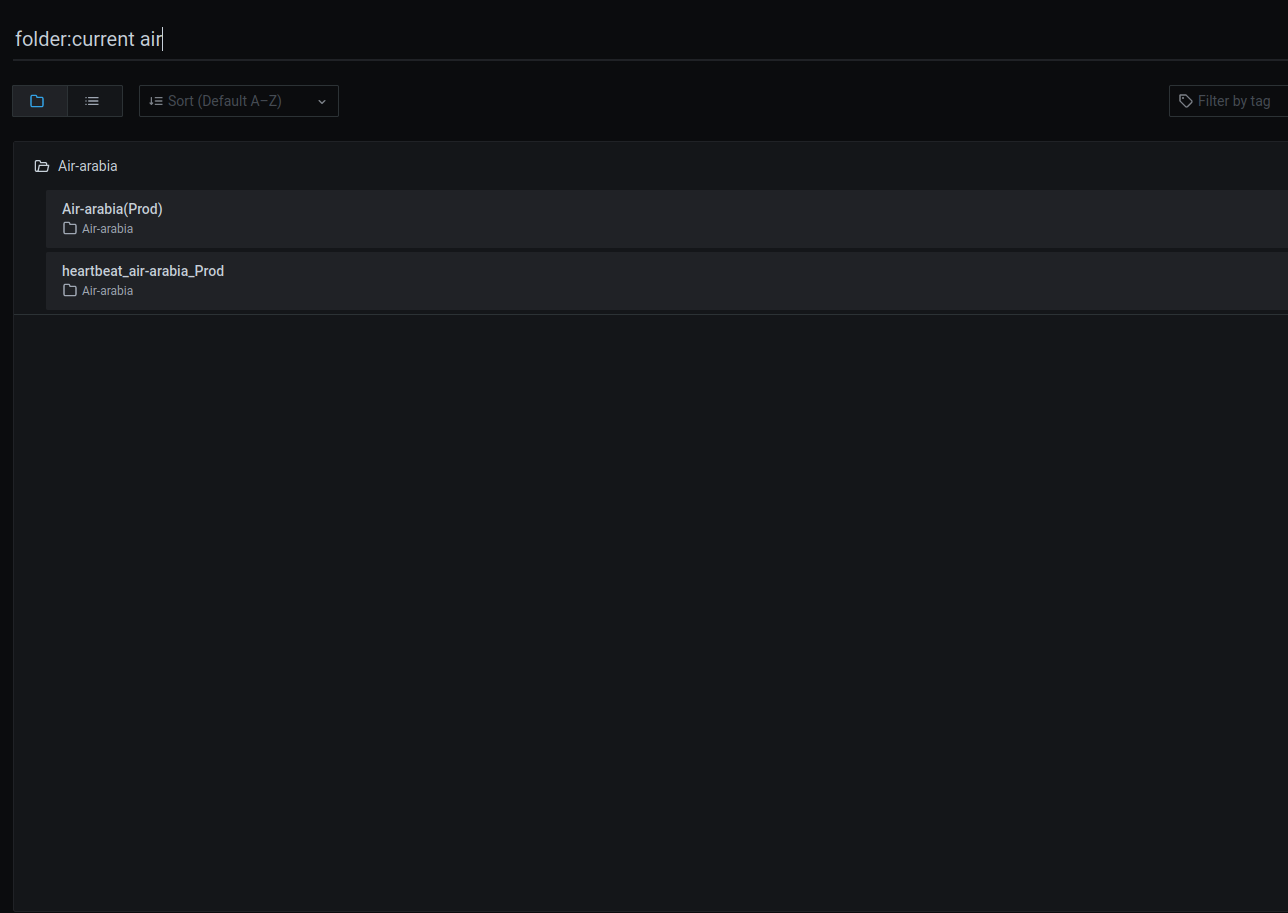
- Search for the respective dashboard, here incase
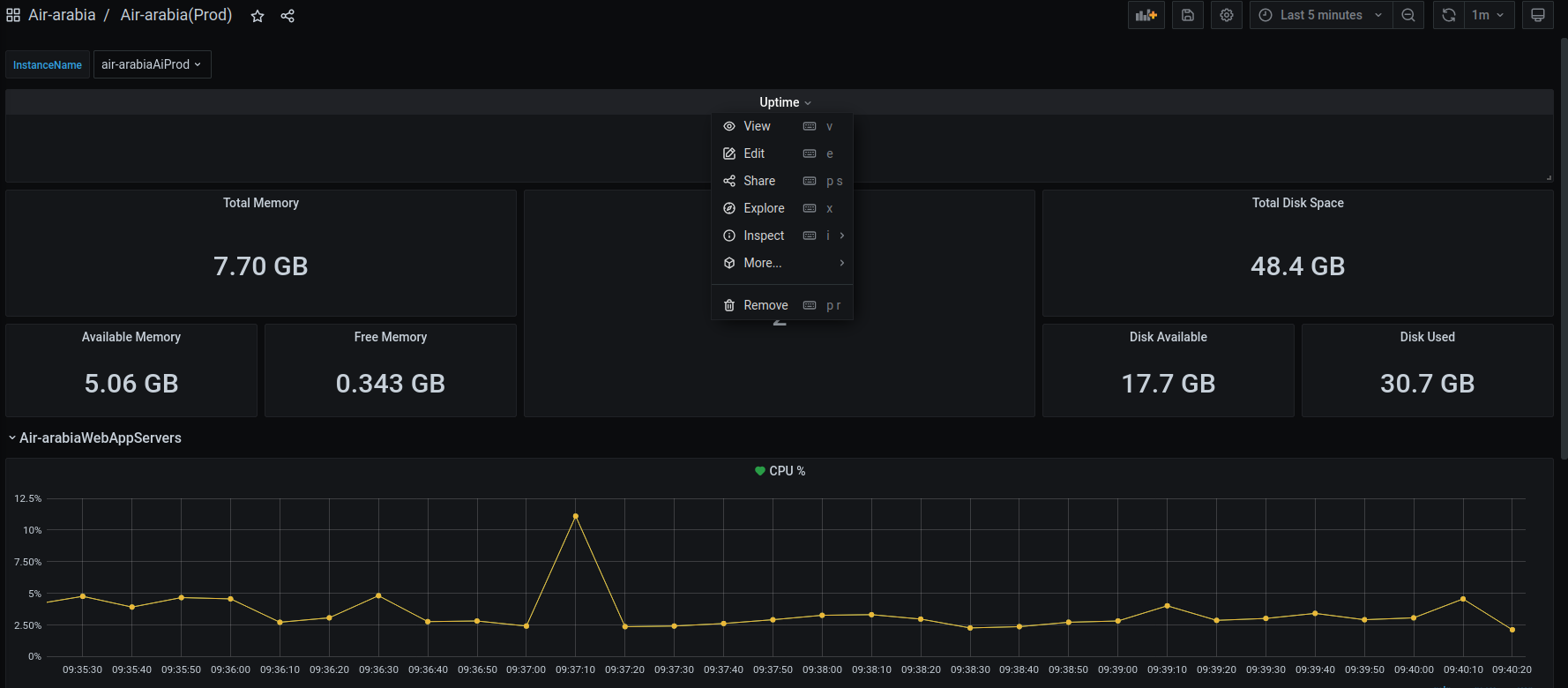
air-arabiadashboard. You can see in below image reference. - Delete all the monitoring dahsboards. Below image is for only ref.
- Click on the specification you want to delete, click on the
Removeand confirm the removal. - Delete all the dashboards under repective brand.
soft_sunset
After successfully taking the backup,
Enable the
TerminationProtection.Go to
Actions-->Instance settings-->Change instance termination protectionand selectenable.Stop the
Utility,dBinstances.webAppandAIservers will be done byASGwhich is explained below.
- Delete the
Webapp,AIload balancers, by enabling the Deletion protection (if it is not enabled.)- Load_balancers naming will be
brandName-prod-ai-ALB,brandName-prod-webApp-ALB - Here,
bajaj-thai-prod-ai-ALB,brandName-prod-webApp-ALB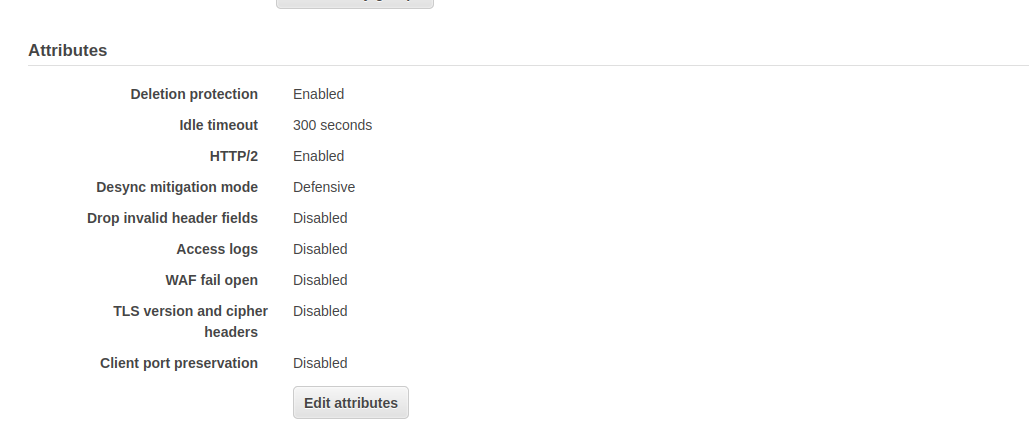
- Load_balancers naming will be
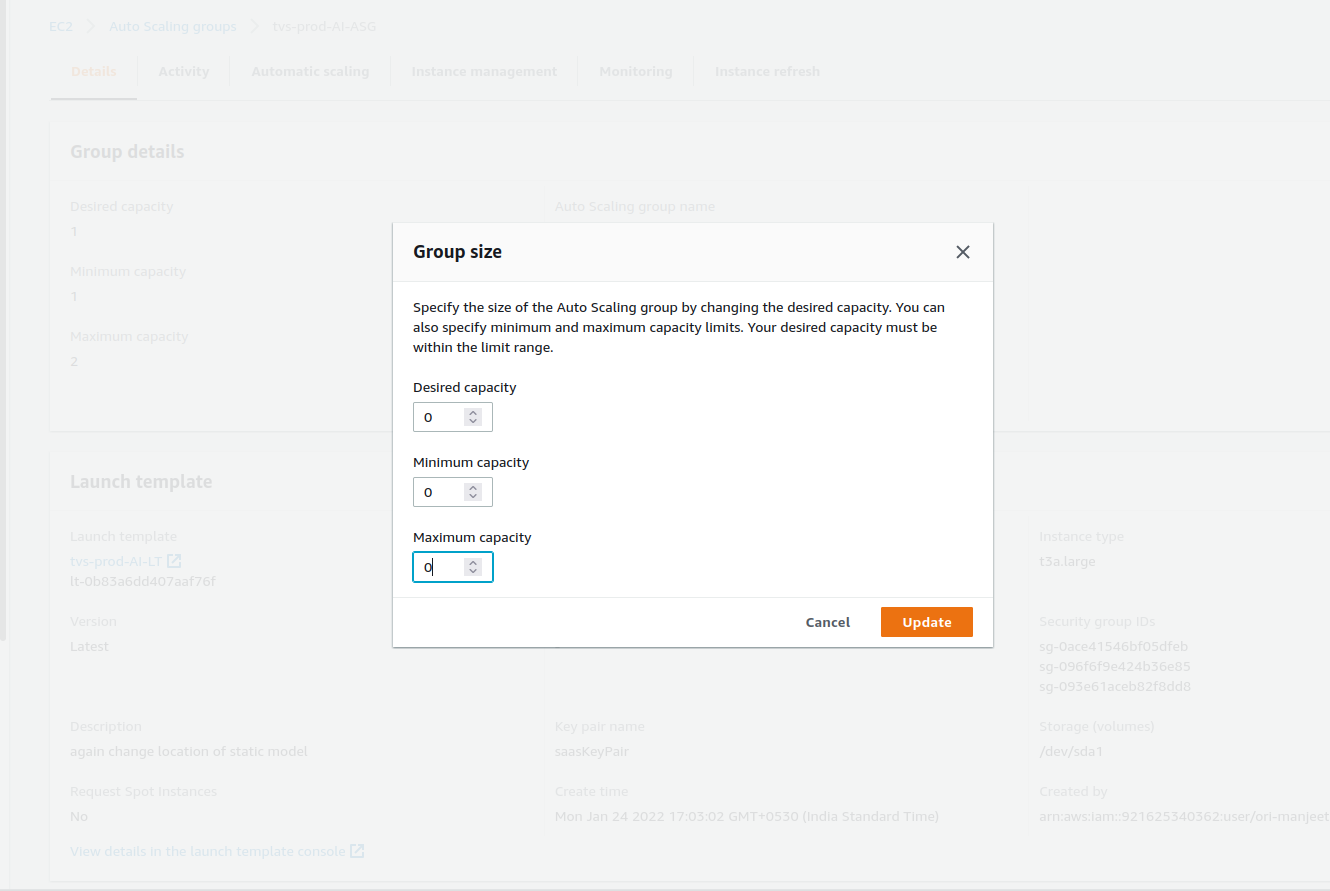
- For Webapp and NLP, update the autoscaling configuration with Desired,minimum and maximum capacity as zero. So that, it will automatically delete the respective instances.
- AutoscalingGroups naming will be
brandName-prod-AI-ASG,brandName-prod-webApp-ASG - Here,
bajaj-thai-prod-AI-ASG,bajaj-thai-prod-webApp-ASG
- AutoscalingGroups naming will be
bot_heart_beat
- In soft sunset, we need to redirect the alarms to
dumped-grafana-alertschannel in slack. - Login to the grafana
- You can see the folder
chatbotas below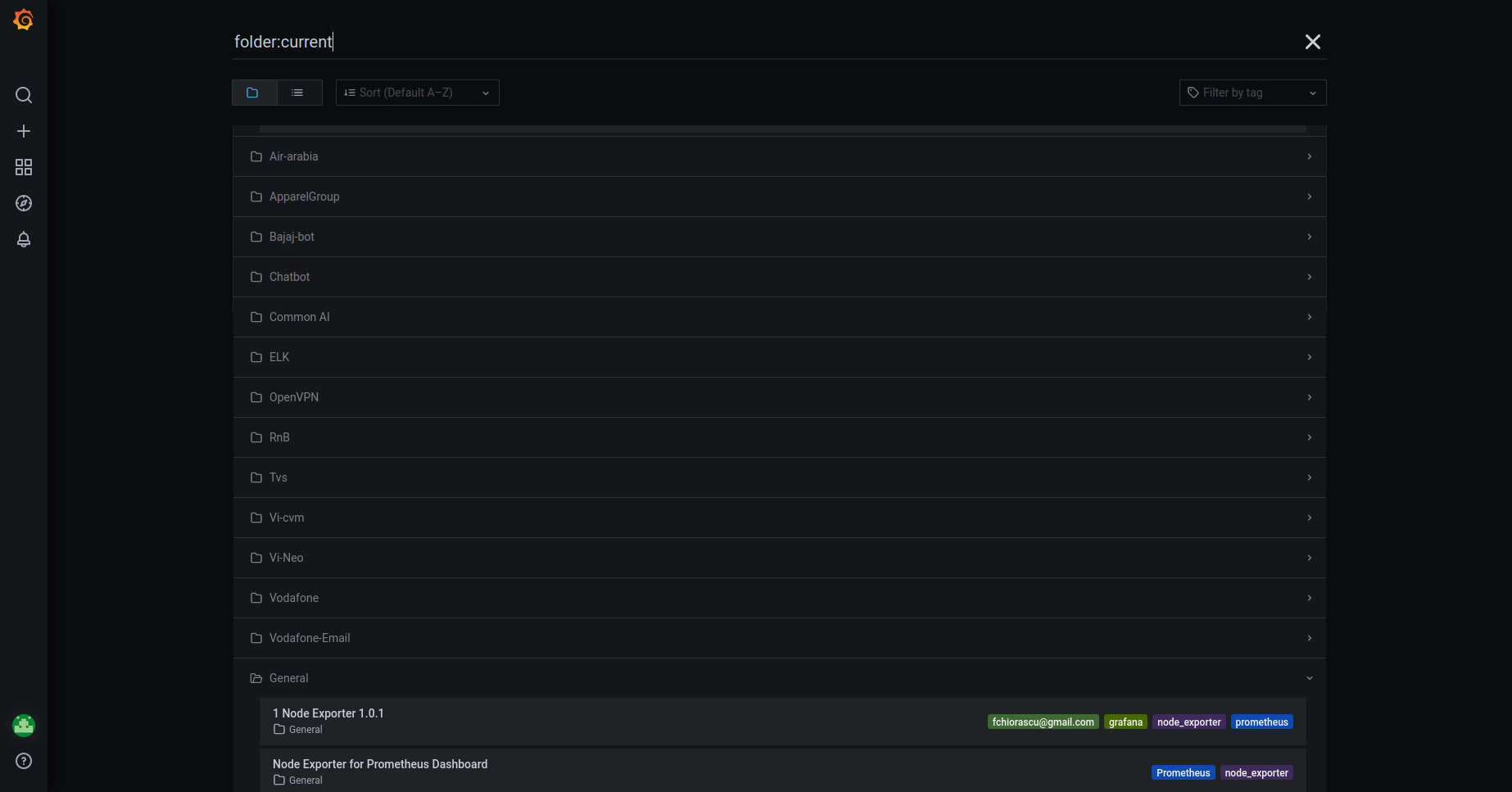
- Get into the chatbot folder, you will find the heartbeats like below
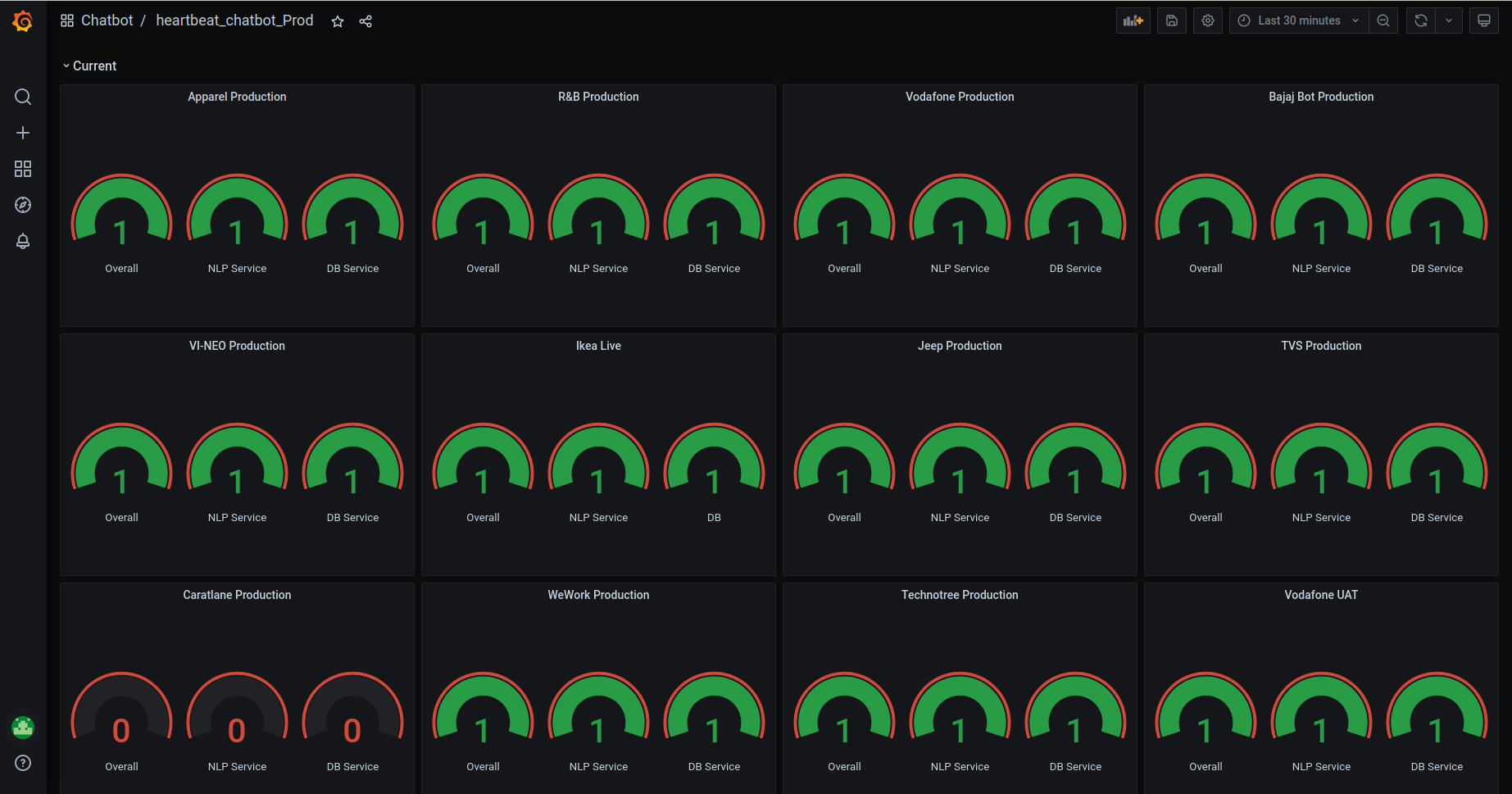
- Scroll down , you can see the alerts like below
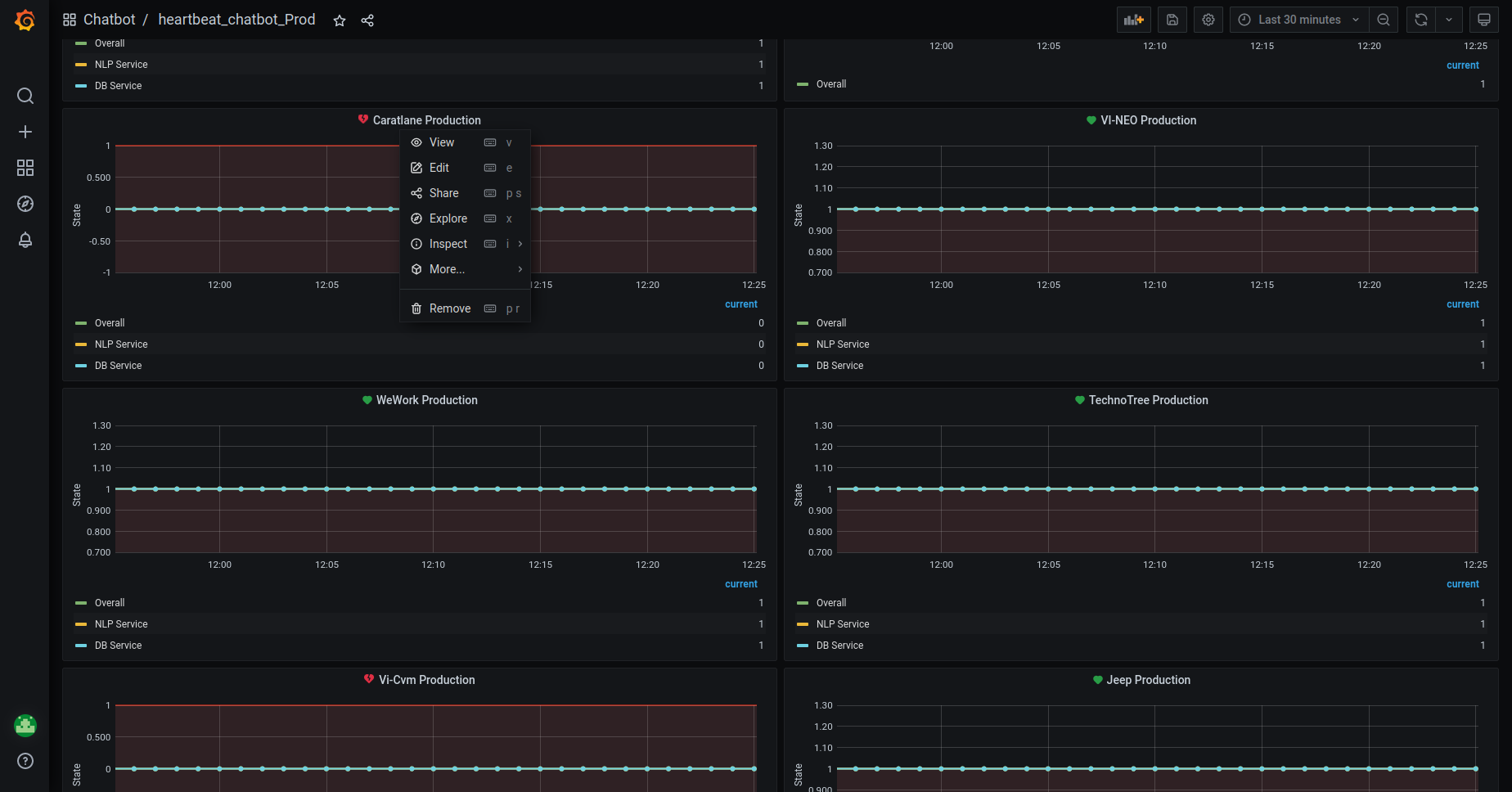
- Click on the
Edit. It will redirect to the page like this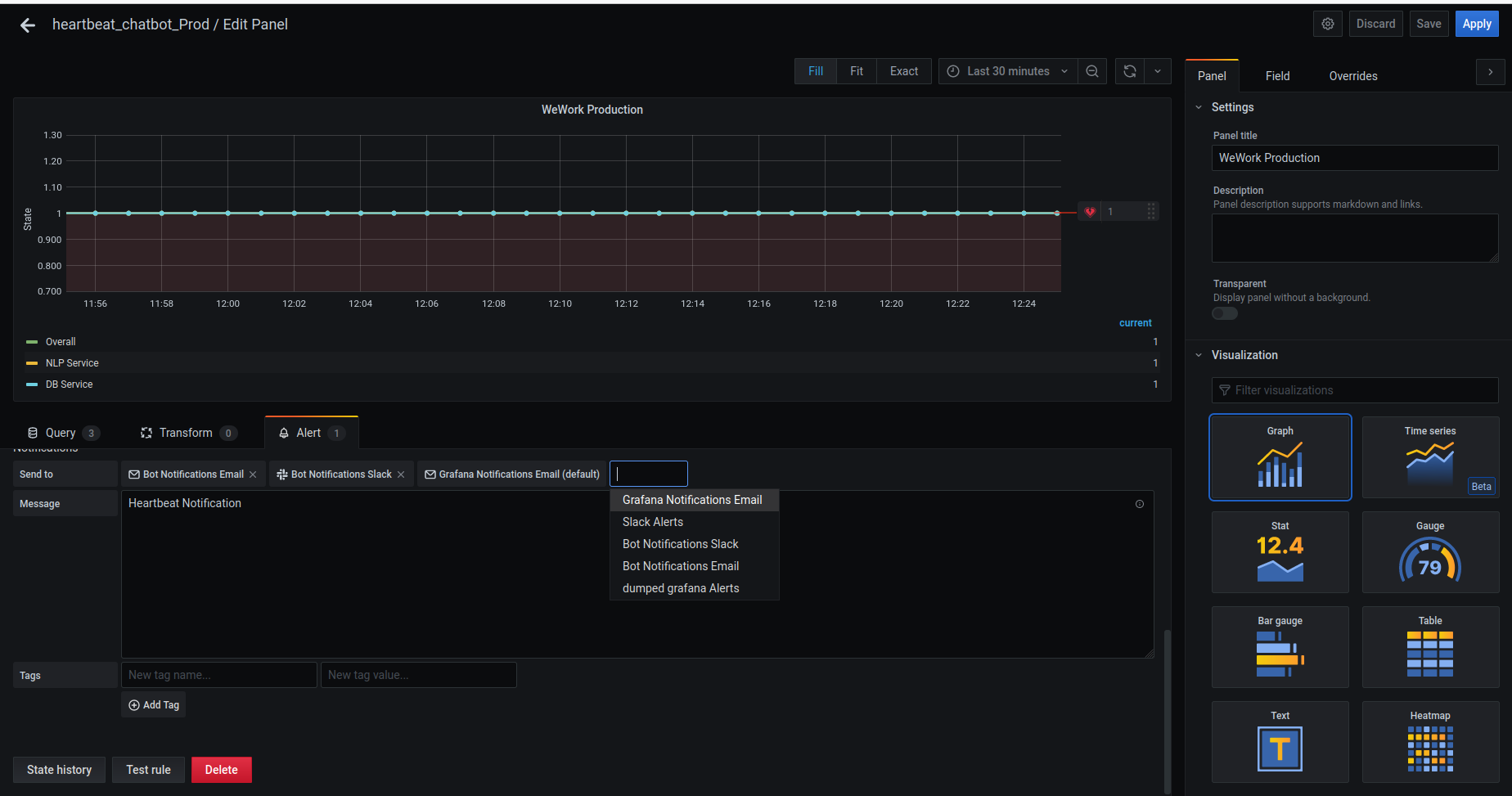
- In the
Alertsection, forSendtooption,- Remove the existing
alerts. - Add the
dumped-grafana-alertschannel and remove all other channels.
- Remove the existing
- Save the
Alert.
hard_sunset
- If the stack is created through
cloudformation, delete the stack through cloudformation only.Below image is only for reference.
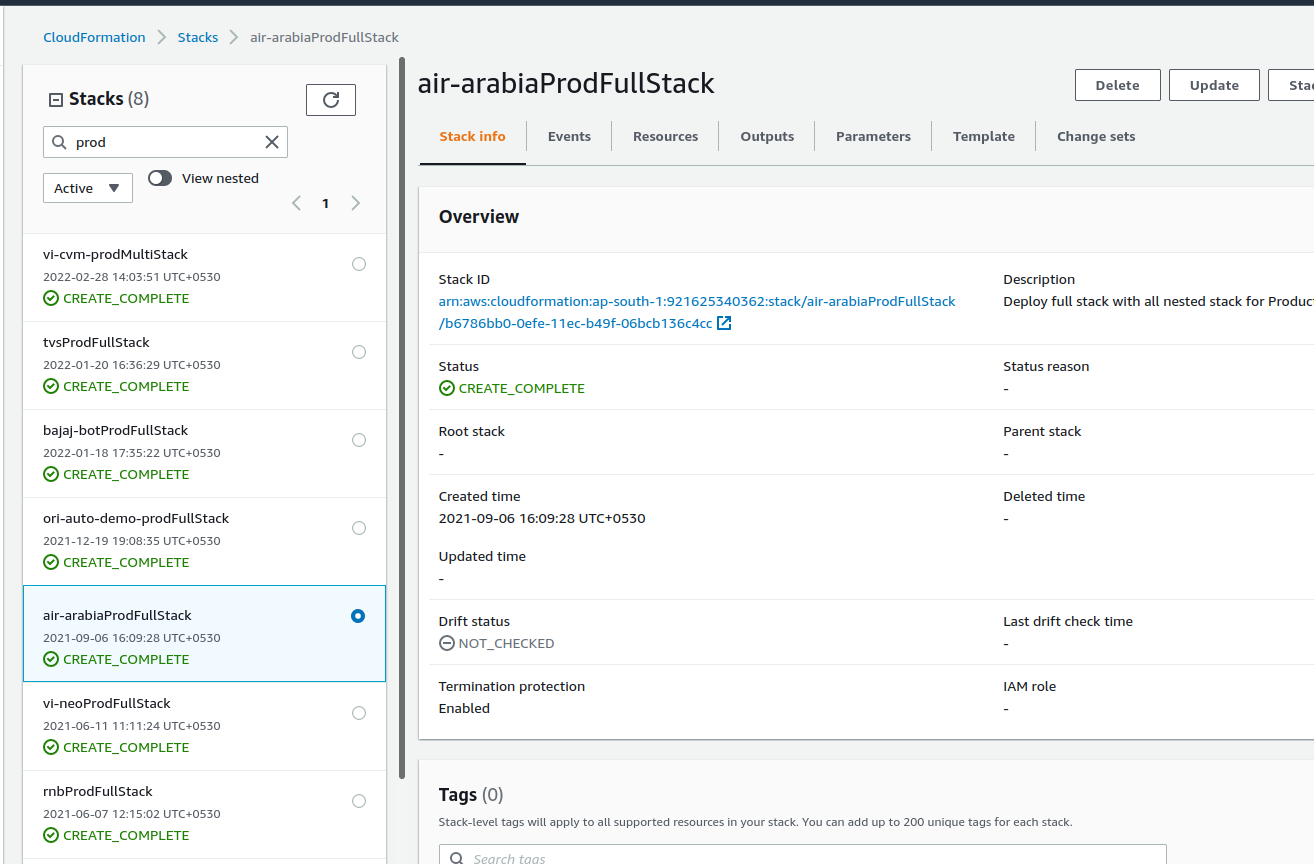
If the stack is created manually, delete the instances manually.
Delete the load balancer,by enabling the deletion_protection.
- Select the load balancer.
- on the
Descriptiontab, chooseEdit attributes - On the
Edit load balancer attributespage, selectEnableforDeletion Protection, and then chooseSave.
Launch_Template_Backup
- We use LaunchTemplates for 2 services.
WebappandNLP
- We need to take the backup of the launch template data from
NLPandWebAppLaunchTemplates.- command :
aws ec2 describe-launch-template-versions --versions '$Latest' --launch-template-id <--launch template-Id--> --query "LaunchTemplateVersions[*].LaunchTemplateData" > LT.json
- command :
- It will save the launch template data of the latest version into the
LT.jsonfile. - Upload this LaunchTemplate backup file into S3. Location will be as follows.
- For NLP :
s3://oriserve-demos/brandName/Backup/Environment/Production/LT_Data/oriNlp/- Command :
aws s3 cp LT.json s3://oriserve-demos/brandName/Backup/Environment/Production/LT_Data/oriNlp/
- Command :
- For Webapp :
s3://oriserve-demos/brandName/Backup/Environment/Production/LT_Data/webApp/- Command :
aws s3 cp LT.json s3://oriserve-demos/brandName/Backup/Environment/Production/LT_Data/webApp/
- Command :
- For NLP :
bot_heart_beat
- In hard sunset, we need to delete the bot_heartbeat alerts.
- Login to the grafana
- You can see the folder
chatbotas below - Get into the chatbot folder, you will find the dashboards like this
- Scroll down to the page, you can we see the configured alarms, as shown below.
- You will get the options like above.
- Click on the
Removeand delete the alarms.